

Text
TCR Registration Rejected: Invalid Campaign Description
Learn why your TCR texting registration was rejected due to an invalid campaign description. Find out what information is required, how to write a compliant campaign description, and what to check before resubmitting your A2P 10DLC registration for approv
TCR Registration Rejected: Invalid Campaign Description
Section titled “TCR Registration Rejected: Invalid Campaign Description”If your TCR registration was rejected because of an invalid campaign description, you’ll need to update the description of your texting program before resubmitting it for approval.
You may see the following message in Swivel:
Your registration was rejected
Use case description: The campaign submission has been reviewed and it was rejected because of invalid campaign description.
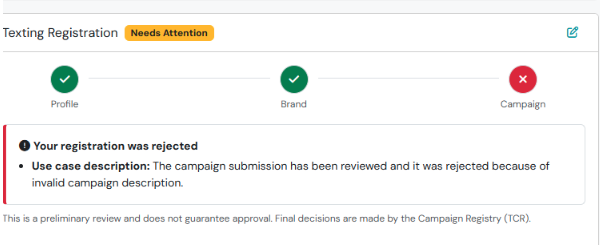
This rejection means the information provided in your campaign description did not clearly explain how your business intends to use text messaging.
Why Was My Campaign Rejected?
Section titled “Why Was My Campaign Rejected?”When reviewing your registration, The Campaign Registry (TCR) evaluates whether your campaign description clearly identifies:
- Who is sending messages: Your registered business or organization.
- Who receives messages: Clients, prospects, or other individuals who have consented to receive texts.
- Why messages are sent: The specific purpose of your texting program, such as appointment reminders, scheduling updates, or customer service communications.
Your description must also align with your registered business, selected campaign use case, and sample messages.
How to Correct Your Campaign Description
Section titled “How to Correct Your Campaign Description”Step 1: Review Your Original Description
Section titled “Step 1: Review Your Original Description”Descriptions that are too general or include information unrelated to the purpose of the texting program may be rejected.
Example of a description that may be rejected:
Section titled “Example of a description that may be rejected:”“We use texting to send reminders, follow-ups, and important notifications to our clients. Please call our office with questions. Reply STOP to opt out.”
Why this may be rejected:
Section titled “Why this may be rejected:”- It does not identify the business sending the messages.
- Terms such as “follow-ups” and “important notifications” are too broad.
- It includes message-specific instructions instead of focusing on the purpose of the texting program.
Step 2: Write a Clear, Specific Description
Section titled “Step 2: Write a Clear, Specific Description”Your description should explain how your business uses texting, who receives messages, and why.
Example of a more complete description:
Section titled “Example of a more complete description:”“[Business Name] uses SMS messaging to communicate with clients and individuals who have opted in to receive text messages. Messages include appointment confirmations and reminders, scheduling updates, follow-up communications regarding client inquiries, and service-related notifications. These messages help clients stay informed about their appointments and ongoing services. Messages are sent only to individuals who have provided consent to receive SMS communications from [Business Name].”
Step 3: Check for Consistency
Section titled “Step 3: Check for Consistency”Before resubmitting, confirm that:
- Your business name matches your registered brand.
- Your description accurately reflects the messages you intend to send.
- Your sample text messages match the stated purpose.
- Your website’s SMS opt-in language supports the messaging activities described.
- Your campaign use case accurately represents your texting program.
What Happens Next?
Section titled “What Happens Next?”- Once you’ve updated your campaign description, the registration can be resubmitted for review.
- Approval is not automatic, and additional changes may be requested during the review process.
- If you’re unsure how to update your description or need assistance with your rejected registration, please contact Swivel Support.
Does this mean my website needs to be updated?
Section titled “Does this mean my website needs to be updated?”Not necessarily. An invalid campaign description rejection typically relates to the information submitted during registration.
Can I use the example description provided above?
Section titled “Can I use the example description provided above?”Yes, as a starting point. Be sure to replace the business name and adjust the messaging purposes to accurately reflect how your organization uses texting.
Should I include STOP instructions or my business phone number in the campaign description?
Section titled “Should I include STOP instructions or my business phone number in the campaign description?”The campaign description should focus on the purpose of your messaging program. STOP instructions and support contact details generally belong in your sample messages, opt-in disclosures, or messaging terms, as applicable.
Do I need to create a new TCR registration?
Section titled “Do I need to create a new TCR registration?”No. An invalid campaign description can typically be corrected and resubmitted. A new registration may be necessary if the selected campaign use case or associated brand is incorrect.
How long will approval take after resubmitting?
Section titled “How long will approval take after resubmitting?”Review times vary. Resubmitting your campaign does not guarantee approval, and additional information may be requested.